Note
Genie is changing fast. The names and availability in this post are as of 20 November 2026. In April 2026 Databricks One was renamed Genie, and in June the business chat became Genie One. In July, Genie Spaces were renamed Genie Agents. Check the release notes before you plan around a preview feature.
What Databricks Genie is
Databricks Genie is a family of conversational assistants and autonomous agents built into the Databricks platform. People ask in plain language, and Genie answers or does the work against company data. Every request runs under the permissions the company already has in Unity Catalog.
Each Genie experience is aimed at a different group of people:
| Genie experience | Who it is for | What it does |
|---|---|---|
| Genie One | Everyone in the business | A chat and workspace experience. People ask questions about governed data, upload files, keep memory, schedule tasks and produce slides or reports. It is available on the web, mobile, the desktop app, Slack and Teams. |
| Genie Agents (formerly Genie Spaces) | Analysts and domain teams | A domain agent, such as Sales or Finance, curated by the people who know the data. It holds selected tables, instructions, example SQL and benchmark questions. Agent mode handles multi-step research questions. |
| Genie Code | Data engineers, data scientists and ML engineers | An autonomous agent for engineering work: building pipelines and CDC flows, writing and fixing notebooks and SQL, authoring dashboards, and monitoring and triaging pipeline failures. |
| Always-on Genie | Teams who want work delegated | Announced in November 2026 as "coming soon" to preview. You give it a goal, and it works in the background on its own compute. It splits work across subagents, follows up on missing inputs and asks you for decisions. |
Genie is not a separate product that you connect to Databricks. It reads the same tables, uses the same permissions and runs on the same compute as the rest of your lakehouse. That is why it is worth taking seriously: the governance work you have already done carries over.
Key components
The shared components are what make Genie answers trustworthy. Without them, Genie is just a chatbot that guesses SQL.
1. Unity Catalog: who can see what
- Genie answers only from tables, views, volumes and functions that the asking user can access, including row filters and column masks.
- Table and column comments, primary and foreign keys, tags and metric views tell Genie what the data means and how tables join.
- Lineage and audit logs show which data each answer used.
2. Genie Ontology: what the business means
The Ontology is the governed business context: definitions, metrics, people and processes. Where each word can mean different things, it settles the meaning. For example, "active customer" means exactly one thing, and "revenue" means net of returns in INR.
- It learns from your existing dashboards, queries, notebooks, dbt models and external BI tools.
- People curate it: domain owners approve or fix what it proposes, and the coming Ontology Manager flags the concepts people ask about most.
- Genie Ontology is generally available.
3. Unity Gateway: control over actions and spend
- Approval rules decide what an agent may do on its own, and what needs a person's yes first.
- Budgets and spend limits cap Genie usage per team, with Budget Manager and Budget Viewer roles.
- Traces of Genie Code and Genie One steps go to a unified trace table, so you can audit and debug agent behaviour (Beta).
- Shared skills and MCP connectors give governed access to tools such as GitHub, Atlassian, Google Drive, Microsoft 365 and Slack.
4. Genie Agents: curated domain knowledge
A Genie Agent is where accuracy is won or lost. Each agent has:
| Element | Purpose |
|---|---|
| Data | Up to 50 tables, views or metric views, kept to one domain |
| Instructions | Business rules, such as "fiscal year starts 1 April" or "exclude test accounts" |
| Example SQL and SQL functions | Trusted answers for the questions that matter most |
| Benchmarks | A set of real questions with expected answers, rerun after every change |
| Files | PDFs, contracts and slides in UC volumes, with page-level citations (Public Preview) |
| Connectors | MCP tools the agent may call (Beta) |
5. Genie Code: the engineering agent
Genie Code works where engineers already work: notebooks, the SQL editor, Lakeflow pipelines, dashboards and jobs. Its abilities are covered in the next section.
6. Compute
- Serverless SQL warehouses run the SQL that Genie generates.
- Lakeflow pipelines and jobs are what Genie Code builds and watches.
- Model serving provides the models and agent compute behind the scenes, so you do not run your own LLM endpoint.
How Genie supports data engineers
Most data engineering time goes on repeat work rather than design: boilerplate pipelines, failed-run triage, ad-hoc "can you pull this" requests and documentation. Genie takes over a large share of that work.
Genie Code in the daily workflow
| Task | Without Genie | With Genie Code |
|---|---|---|
| New ingestion pipeline | Hand-write a Lakeflow pipeline, set up CDC and add expectations | Describe the source and target. Genie Code drafts the pipeline, the CDC flow and data quality expectations, and keeps staging and production apart. |
| Failed run at 2 AM | Open the logs, find the failing task, search for the error | Genie Code monitors Lakeflow pipelines in the background, triages the failure and proposes a fix to review. |
| Slow or wrong SQL | Read the plan, rewrite, test | Ask Genie Code to explain, optimise or fix the query in the notebook or editor. |
| Dashboards for stakeholders | Build each visual by hand | Genie Code authors dashboards and calculated measures from a description. |
| ML workflows | Wire up experiments and serving | It runs ML workflows end to end, logging experiments to MLflow. |
| Remembering team conventions | Wiki pages nobody reads | Persistent memory updates its own instructions from past interactions. |
Databricks reports an internal test on real-world data science tasks. In it, Genie Code's success rate rose from 32.1% to 77.1% compared with leading coding agents. Treat this as a vendor benchmark and run your own pilot.
Fewer ad-hoc requests
A well-curated Genie Agent answers routine questions that used to arrive as tickets for the data team, such as "What were last month's returns by region?". Engineers then spend that time on the data products the agents depend on.
A clear contract for data quality
Genie makes poor metadata obvious very quickly. A missing comment or an ambiguous column shows up as a wrong answer in a benchmark. This gives engineers a measurable reason to keep gold tables well documented and modelled. Use metric views for shared definitions and Lakeflow expectations for data quality.
Engineering guardrails to keep
Warning
Treat Genie Code output like a pull request from a new team member: review it, test it and deploy it through your normal CI/CD. Do not give an agent write access to production through approval rules until you have weeks of traces showing it behaves well.
- Run Genie Code against dev and staging catalogs first, and keep production changes going through Git and pipelines. See the Terraform and Unity Catalog automation notes.
- Give agents service principals with least privilege. Service principal usage is billed at standard pay-as-you-go rates and does not count against the free allowance.
- Keep the trace table and benchmark results as part of on-call review.
Use cases
| Area | Example | Genie experience |
|---|---|---|
| Self-service analytics | "Top 10 SKUs by margin this quarter vs last, by region" | Genie Agent for the Sales domain |
| Executive briefing | A weekly revenue brief emailed every Monday | Genie One scheduled task, or always-on Genie |
| Data engineering | Build CDC from SQL Server into bronze, silver and gold, with quarantine | Genie Code |
| Pipeline operations | Triage the overnight Lakeflow failures and propose fixes | Genie Code background monitoring |
| Documents and contracts | "Which supplier contracts renew in Q1 with price-increase clauses?" | Genie Agent with UC volume files |
| Marketing | Find the best-performing ad creatives each week | Genie Agent or always-on Genie. HelloFresh reported finding Meta ad winners 75% faster. |
| Customer success | Watch usage drops and flag at-risk accounts | Always-on Genie with alerts |
Outcomes and business benefits
| Outcome | What changes | How to measure it |
|---|---|---|
| Faster answers | Business users get answers in minutes instead of waiting days for an analyst | Median time from question to answer |
| Less ticket load | Routine data requests stop reaching the engineering queue | Count of ad-hoc data tickets per month |
| Higher engineering throughput | Pipelines, fixes and dashboards are drafted by Genie Code, and engineers review instead of type | Lead time for pipeline changes, PRs per engineer |
| Faster recovery | Failures are triaged before a person opens the logs | Mean time to repair for pipeline incidents |
| One version of the truth | The Ontology and metric views give every answer the same definition | Benchmark accuracy, number of conflicting reports retired |
| Governance kept | Answers respect existing permissions, and every step is traced | Audit findings, unauthorised-access incidents (target zero) |
| Controlled cost | Pay for use, not per seat, with Gateway budgets | DBU spend against budget per team |
Tip
Billing for Genie One and Genie Agents is paused until 31 January 2027. Genie Code includes 150 free DBUs per user per month, then a promotional discount until the same date. This is a low-cost window for a pilot, but set budgets now so the first invoice in February holds no surprises.
What Genie does not fix: unclear ownership of data, tables nobody trusts, and metrics that two departments define differently. Genie makes these problems more visible. Plan time in Phase 0 to fix them.
Implementation design
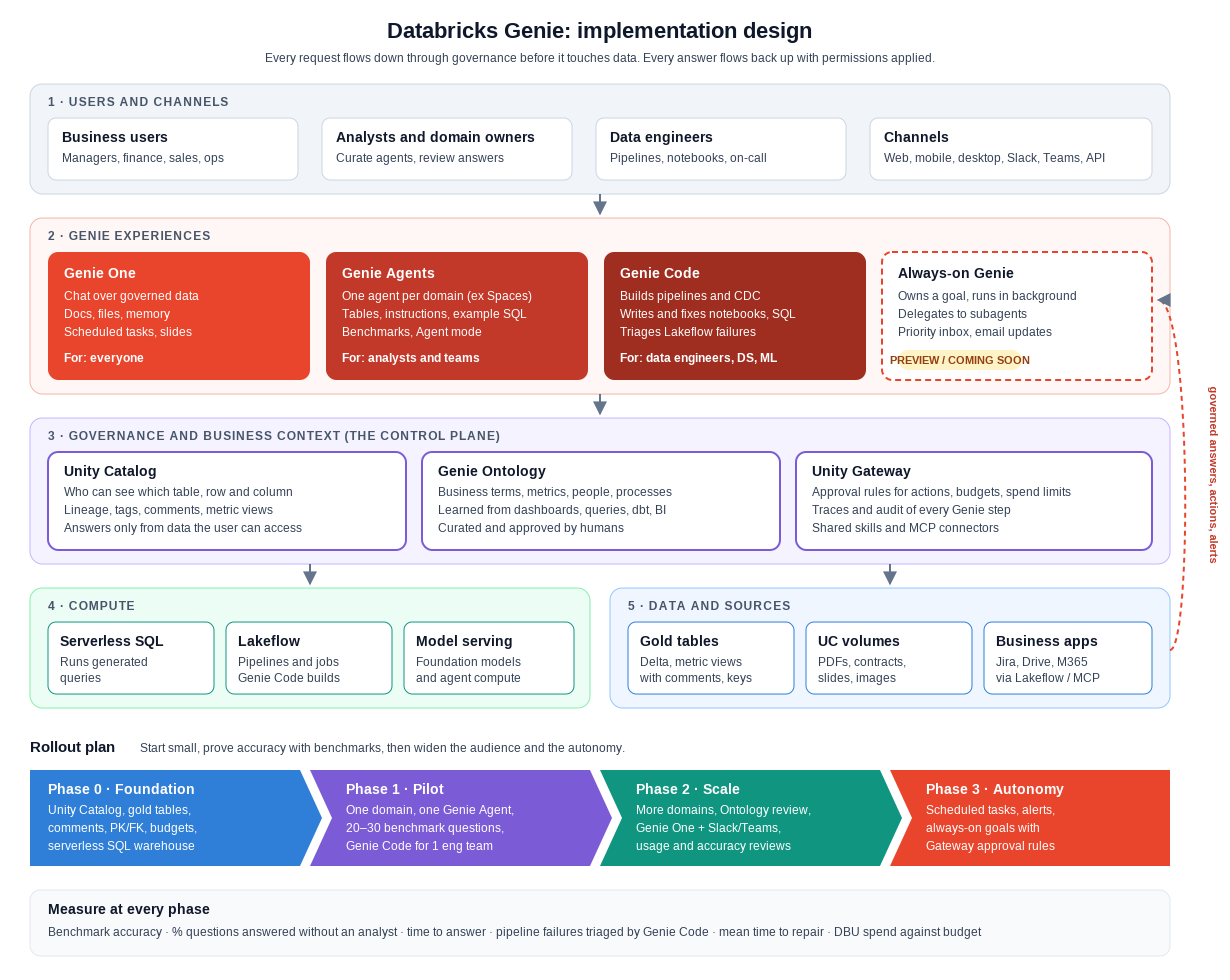
The design has five layers. A request goes down through them, and the answer comes back up with permissions applied:
- Users and channels: the web, mobile, the desktop app, Slack, Teams and the API.
- Genie experiences: Genie One, Genie Agents, Genie Code and always-on Genie.
- Governance and context: Unity Catalog, Genie Ontology and Unity Gateway. Nothing reaches data without passing through this layer.
- Compute: serverless SQL, Lakeflow and model serving.
- Data: gold tables and metric views, UC volumes, and business apps through Lakeflow Connect or MCP.
Phase 0: Foundation (2 to 4 weeks)
| Step | Detail |
|---|---|
| Unity Catalog in place | All target data is in UC, not in the legacy Hive metastore. See the table ACL migration. |
| Gold layer ready | Curated tables for the pilot domain, with comments on every table and column |
| Keys and metric views | Declare primary and foreign keys, and define core metrics once in metric views |
| Groups and permissions | Business-user groups with read access to gold only, plus row filters where needed |
| Compute | A serverless SQL warehouse for Genie, with auto-stop set |
| Cost and governance | Unity Gateway budgets per team, and decide who may approve agent actions |
COMMENT ON TABLE prod.sales.fct_orders IS 'One row per order line. Amounts in INR including tax.';
ALTER TABLE prod.sales.fct_orders ALTER COLUMN net_amount COMMENT 'Line amount after discounts, before tax, INR';
ALTER TABLE prod.sales.dim_customer ADD CONSTRAINT pk_customer PRIMARY KEY (customer_id);
ALTER TABLE prod.sales.fct_orders ADD CONSTRAINT fk_orders_customer
  FOREIGN KEY (customer_id) REFERENCES prod.sales.dim_customer (customer_id);
Phase 1: Pilot (4 to 6 weeks)
- One domain, one Genie Agent. Choose a domain with a motivated owner and clean data, such as sales or finance operations.
- Write 20 to 30 benchmark questions from real tickets before you open the agent to users, and set a target such as 90% correct.
- Add instructions and example SQL for the questions that fail, then rerun the benchmarks.
- Genie Code with one engineering team, in dev and staging only. Track pull requests drafted, review time and failures triaged.
- Run a weekly review of wrong answers. Each wrong answer becomes an instruction, an example or a metadata fix.
Phase 2: Scale (2 to 3 months)
- Add domains one at a time, each with its own agent, owner and benchmarks. Avoid a single agent that covers everything.
- Review and approve Genie Ontology proposals, so the definitions are shared across agents.
- Open Genie One to business users, along with Slack or Teams, and embed agents in internal portals.
- Add documents from UC volumes and MCP connectors where they answer real questions.
- Set up monthly usage, accuracy and spend reviews from traces and system tables.
Phase 3: Autonomy (when it is available and trusted)
- Start with scheduled tasks and alerts, such as weekly briefs and threshold alerts, which are low-risk.
- Move to always-on goals only with Unity Gateway approval rules for every action that changes data or contacts people.
- Allow Genie Code to apply fixes without review only for narrow, well-tested cases. Keep the rest as proposals.
Roles and ownership
| Role | Owns |
|---|---|
| Platform team | Unity Catalog, warehouses, Gateway budgets and approval rules, traces |
| Data engineers | Gold tables, metadata, metric views, pipelines, Genie Code reviews |
| Domain owner or analyst | The Genie Agent: instructions, examples, benchmarks, wrong-answer review |
| Data governance | Ontology approvals, sensitive-data policies, audits |
| Business champions | Onboarding users, collecting real questions |
Go-live checklist
- Benchmarks pass at the agreed target, and they rerun after every change
- Every table in the agent has table and column comments
- Row filters and masks are tested with a non-admin test user
- Gateway budgets and alerts are set for each team
- Approval rules block writes and outbound messages until they are reviewed
- The trace table is reviewed weekly during the first month
- Users know how to flag a wrong answer, and someone owns the follow-up
Common pitfalls
| Pitfall | Fix |
|---|---|
| One huge agent over hundreds of tables | One domain per agent, with up to 50 well-documented objects |
| Raw bronze or silver tables in an agent | Give agents gold tables and metric views only |
| No benchmarks | Without benchmarks you cannot prove accuracy or catch regressions |
| Agent actions enabled on day one | Start read-only and add approval rules before any write |
| Treating Genie Code output as final | Keep it in Git, with review and CI/CD like any other change |
| No budget before free usage ends | Set Gateway budgets now, before 31 January 2027 |
Summary
- Genie brings conversational and agentic help to every data role. Business users get Genie One, domain teams get Genie Agents and engineers get Genie Code, with always-on autonomy coming next.
- Its value depends on the foundation: Unity Catalog permissions, well-documented gold tables, metric views and a curated Ontology.
- Roll it out in phases:
- Build the foundation.
- Pilot one domain with benchmarks.
- Scale domain by domain.
- Add autonomy last, behind Unity Gateway approval rules.
Related reading: Rolling out AI/BI dashboards and Genie spaces.
Get the weekly HubDatAI email
One email a week with everything new: posts, learning sessions and videos. Free, no spam, unsubscribe in one click. What you get